Accessibility Lives in the Workflow: A Practical Project for QA and Design
Test a complete application journey with keyboard navigation, visible focus, understandable errors and accessible authentication. Build a small evidence pack that connects design decisions to reproducible checks.
A form can look tidy while preventing someone from finishing a task. The problem may appear only when a keyboard user opens a modal, when a sticky footer covers the focused control, or when an authentication step refuses pasted text. Reviewing one screenshot cannot expose the whole journey. Accessibility work becomes more useful when design, engineering and QA follow a person from the first action to a meaningful result.
For a portfolio project, choose a small workflow you own: find a fictional vacancy, save a draft application and return to it after signing in. Use synthetic information and a local or development environment. This article proposes a review method and a set of artifacts; it does not certify a product or report the prevalence of accessibility problems in ApplyDjinn's vacancy catalog.
Define the task before the checklist
Write a short success statement that a person can understand without technical vocabulary. In this example, a user can locate a role, save their progress and return without losing the draft. Then identify the screens, dialogs and errors involved. Keep the task small enough to reproduce. A single journey with several states is a better starting point than an enormous list of isolated interface components.
Record the environment used for each review: browser, operating system, viewport, zoom setting and relevant assistive technology. These details help another person reproduce a failure. They also prevent an accidental claim that one successful test represents every user's experience. If you have never used a screen reader, describe that limitation and learn its basic navigation before drawing conclusions from a confusing first session.
Use the standard precisely
WCAG 2.2 supplies testable success criteria and conformance requirements. Its scope is broader than the small exercise here. One relevant Level AA criterion, Focus Not Obscured (Minimum), concerns a focused component being entirely hidden by author-created content. The enhanced criterion is stricter. Describe the criterion you actually tested rather than treating a polished focus ring as proof that an entire website conforms.
Keep standards references beside your findings. A report can distinguish a reproduced criterion failure, a usability concern requiring investigation and a suggestion from a reviewer. Those categories support different conclusions. Avoid presenting every preference as a standards violation. Precision makes collaboration easier: the designer can see the problem, the engineer can reproduce it and the product owner can understand what blocks the task.
Walk the journey using a keyboard
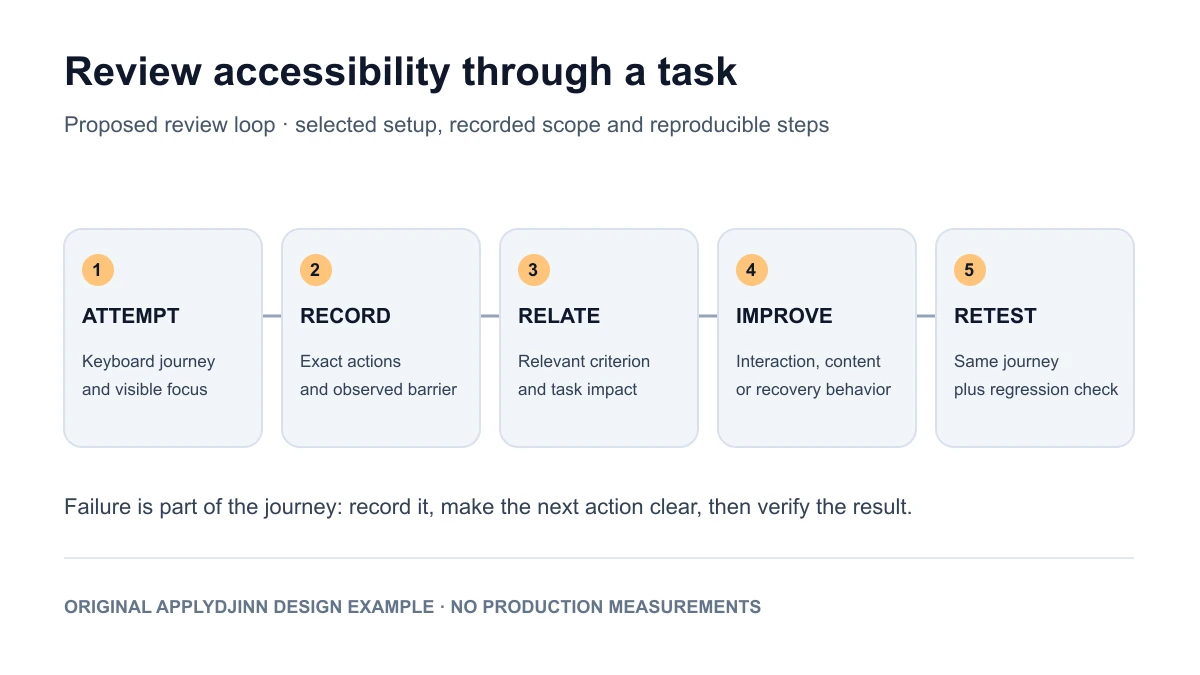
Begin at the top of the page and follow the intended path without a mouse. Note where focus moves, whether the focused item is visible and whether its purpose is understandable. Open the filter dialog, change a value, apply it and return to the results. Then open and close the application draft. Test the ordinary path before adding edge cases so your report has a clear baseline.
For every problem, capture the starting state, exact actions and observed result. A useful finding might explain that focus disappears behind a persistent footer after a dialog closes. Include a short recording or annotated image if it clarifies the behavior. Do not rely solely on a screenshot of the final page, because it may omit the sequence that caused the problem or hide where keyboard focus actually landed.
Examine names and state changes
A control's visual appearance and its programmatic meaning need to describe the same action. Inspect the accessible name of an icon-only button and the state exposed by a selected filter or expanded section. In the exercise, compare the information available to someone looking at the screen with the information announced during navigation. Record discrepancies in terms of the task they obstruct rather than collecting attributes without context.
Watch what happens after a search finishes. If the result count changes, can the user understand that the operation completed? If a save fails, is the error associated with the relevant action? Propose an announcement strategy and test it with the chosen setup. Excessive announcements can become distracting, so document what changed and why the proposed behavior helps this particular workflow.
Make errors part of the design review
Submit an incomplete draft deliberately. Inspect whether the user can find the affected field, understand the correction and retain information already entered. Then try a network failure in a controlled environment. The interface should distinguish a validation problem from an operation that could not complete. A generic message at the top of a long form can leave the actual next step difficult to discover.
Describe error recovery in the design artifact. For example, specify where focus should go after submission and how the user returns to the relevant field. Test the implemented behavior rather than assuming a mockup guarantees it. Include the failed state alongside the successful state in your case study. Recovery often exposes coordination problems that remain invisible in a clean design with perfectly filled inputs.
Include authentication in the journey
W3C's explanation of Accessible Authentication (Minimum) addresses cognitive function tests and the alternatives or assistance that can make authentication possible. Password manager support and copy-and-paste are examples of assistance. The criterion applies across authentication steps, so a convenient first screen does not settle the question if a later step creates a barrier.
In your project, test the actual sign-in and recovery path with the controls you provide. Check whether users can use a password manager, paste where appropriate and return to their saved task. If an external identity provider is involved, document the boundary and the options available rather than pretending your application controls every screen. Preserve security controls while investigating an accessible way to complete the same authentication requirement.
Review layout changes and readable content
Try a smaller viewport and increased text size. Examine whether labels remain attached to their controls, actions stay reachable and a fixed panel covers important content. Use realistic long text, such as an international company name or a multi-line validation message. A layout that works only with short demonstration strings can hide the failure until actual content arrives.
Read the instructions and errors aloud. Replace unclear internal terminology with the action the user can take. If an icon communicates a status, provide an understandable textual equivalent in the relevant context. Document design choices such as persistent field labels and clear section headings. These decisions are useful portfolio material because they connect information architecture to task completion rather than relying on aesthetic preference alone.
Combine automated checks with observation
Run an appropriate automated accessibility checker on the sample states and retain its version and results. Then compare those findings with the manual journey. The W3C Easy Checks resource explicitly describes a first review with limited scope, not a comprehensive evaluation. Treat a clean tool result as one piece of evidence alongside keyboard behavior, content review and informed assistive-technology testing.
Choose regression checks that protect the defect you fixed. A dialog test might verify its accessible name, initial focus and return behavior. A form test might verify the association between an error and a field. Keep human review for questions that your automated assertion does not answer. The case study should explain why each check exists and what could still fail despite it passing.
Prioritize barriers by their effect
Organize the report around blocked tasks and reliable reproduction. An issue that prevents saving a draft deserves a clear owner and acceptance condition. A smaller inconsistency can be recorded without obscuring the blocker. Include the expected behavior, actual behavior, affected state, evidence and retest result. Where the standard supports a finding, link the specific criterion and explain its relevance briefly.
If you involve participants with accessibility needs, obtain permission, respect their time and avoid publishing identifying information or private recordings. State the actual sample and method. One participant's feedback can reveal an important problem without representing every person with a similar disability. For a solo practice project, a careful technical review is still useful when its limited scope is transparent.
Turn the work into career evidence
For a QA role, emphasize the state coverage, reproducible findings and retest conditions. For product design, show how the error and recovery states changed. For frontend engineering, explain the interaction model and the regression test. For product management, discuss the task you prioritized and how the team would know the change helped. Keep your own contribution distinct from a collaborator's review.
Search QA roles, frontend roles or product design roles, then inspect the employer's original requirements. Accessibility may appear as a specific responsibility or as part of broader product quality. Do not infer a hiring trend from the presence of a keyword. Use the listing to choose the part of your evidence pack that answers a concrete need.
A useful definition of finished
Your project is ready to discuss when another reviewer can repeat the journey, reproduce an original barrier and verify the improvement. Keep the before-and-after evidence, the relevant criterion, the implemented change and the remaining questions together. A short case study that follows one real task can communicate more than a long checklist whose relationship to the user is unclear.
The next step is to broaden coverage deliberately: another browser, a different assistive technology, a less familiar user or another error state. Record which gap that additional review addresses. Accessibility is sustained product work, and the portfolio should show that habit: learn how the task fails, make a targeted improvement, verify it and explain the boundary of the evidence you have.
Sources and scope
- W3C: Web Content Accessibility Guidelines 2.2. Normative success criteria and conformance requirements.
- W3C: Understanding Accessible Authentication (Minimum). Informative explanation of the authentication criterion and assistance mechanisms.
- W3C WAI: Easy Checks. A limited first review and a route to more comprehensive evaluation.
- The sample application journey, report structure and proposed tests are original ApplyDjinn guidance. They are not a conformance certification or an assessment of a named employer's product. The illustrations show a proposed review process.