The Backup Finished. Can the Application Recover?
Build a database recovery exercise with synthetic data, an isolated restore and checks for application behavior. Learn how to report recovery time, data loss boundaries and missing dependencies without overstating what one successful test proves.
A scheduled job says that a backup succeeded. A compressed file exists, its size looks plausible and the latest run is green. Those observations answer useful questions about the backup process. They leave another question open: can a replacement application use the recovered data correctly, with the permissions, files and configuration it needs?
A small recovery drill is a strong learning project for backend, database and reliability roles. It brings together data modeling, automation, verification and operational communication. The example below uses a disposable application and synthetic records. It proposes a method you can reproduce locally; it does not describe an incident at ApplyDjinn or report a benchmark for a particular database product.
Define the data you are trying to recover
Start with a tiny application whose important behaviors are easy to inspect. A fictional application tracker might contain users, saved roles, notes and document references. Create synthetic fixtures that cover relationships, empty values, non-ASCII text and a few historical records. Give each fixture a purpose. If your checks use only a single row, a large class of incomplete restores will remain invisible.
Write down the invariants before creating the backup. Every saved role should belong to an existing fictional user. A note should retain its exact text. A referenced document should have a matching test file. A deleted fixture should remain deleted. These statements make the drill more meaningful than opening a database browser and deciding that the tables appear populated.
Choose a backup method with an explicit boundary
PostgreSQL's backup documentation distinguishes SQL dumps, filesystem-level backups and continuous archiving. The methods have different assumptions. For a small practice application, choose one method and explain why it fits the exercise. Avoid mixing instructions from unrelated database engines or assuming that copying a busy database directory creates a consistent backup.
Record the database and tool versions, the start and completion times, the output identity and the expected contents. Keep the method's documentation with the project. Your restore procedure should match the backup format you actually created. If a tool changes defaults between versions, a record of the invocation and environment will help a reviewer understand which behavior your test covered.
Distinguish integrity checks from recovery
An archive checksum can establish that the stored bytes match a previously recorded digest. A format check can detect some forms of corruption. Neither demonstrates every behavior of a restored application. PostgreSQL's documentation for pg_verifybackup explicitly recommends test restores even after verification, because the tool cannot perform every check made when a running server uses a backup.
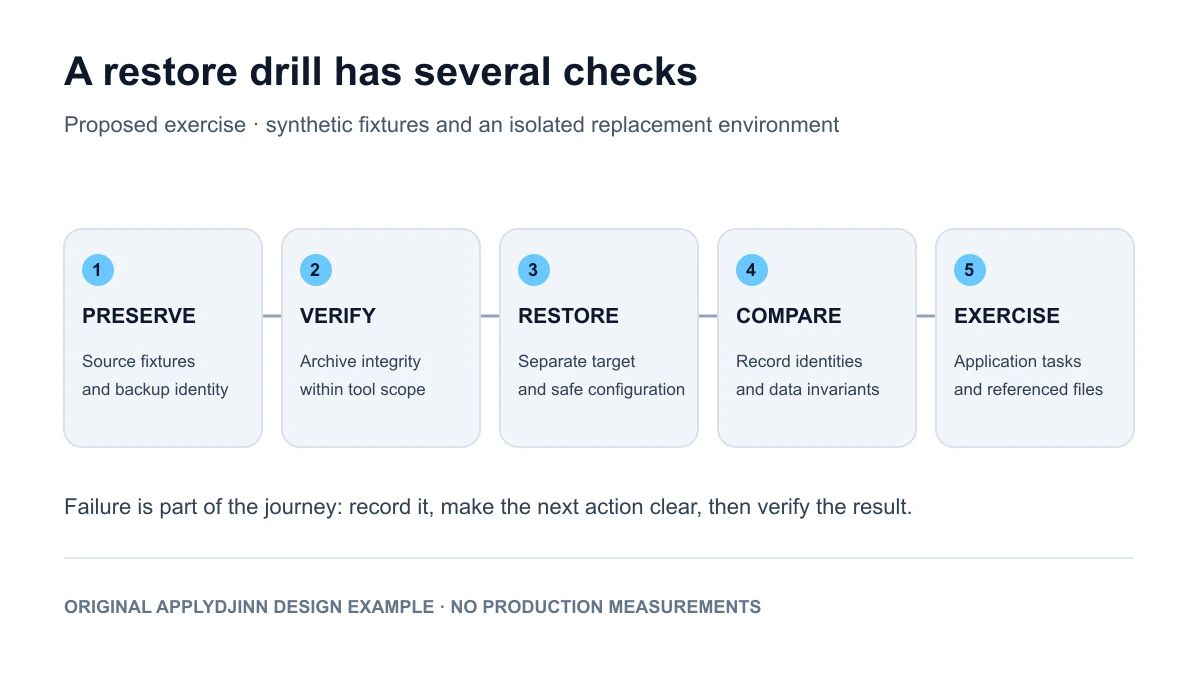
Use several layers of evidence in your project. Verify the archive with the method appropriate to its format. Restore it into a disposable environment. Check database invariants. Then start the sample application against that environment and exercise the core workflow. Record which layer found each deliberately introduced defect. The purpose is to understand what each check establishes, not to accumulate a large number of green status icons.
Isolate the restore before running it
Give the recovered environment a separate identity, storage location and network boundary. It should not be able to send real email, charge a payment method or write to a production integration. Use synthetic secrets and disable unnecessary outbound actions. State these precautions in the exercise instructions so another person can reproduce the drill without inferring which configuration file is safe to use.
Do not test by overwriting the only copy of your sample database. Preserve the source fixture set and the backup while you inspect the restore. Verify the target before executing any destructive setup step. A recovery project should demonstrate control over the destination as well as knowledge of the database command. An otherwise correct restore aimed at the wrong database is still an operational failure.
Check records and meaning
Compare row counts, but do not stop there. Two tables can have equal counts while containing different identities or values. For the small fixture set, compare stable identifiers and selected fields exactly. Check relationships and important constraints. If you use a digest over records, define the ordering, encoding and treatment of null values so that another person can reproduce the same result.
Run a few application actions against the restored environment: sign in with a fictional account, open a saved record, read a note and retrieve a test attachment. A database can look intact while a missing file or incorrect permission prevents the user from finishing a task. Record the expected output and the observed output, including any dependency that had to be reconstructed separately.
Include the things outside the database
List the application's dependencies on files, runtime configuration, roles, encryption keys and external services. For a portfolio example, use harmless generated files and development keys. Explain how the database references them and how the restore obtains the matching versions. A reference to a missing document is a useful failure case because the database rows can pass checks while the user still loses a meaningful capability.
PostgreSQL's SQL dump guidance explains that pg_dump covers one database and does not include cluster-wide objects such as roles and tablespaces. Use that specific boundary to ask a broader project question: what does your chosen method leave outside the archive? Answer for your actual setup. Do not assume that every required dependency is automatically included because the backup tool completed successfully.
Measure the right interval
Define the start and end of the recovery measurement. The time required to decompress an archive is different from the time required to make the application usable. In the project, record separate durations for preparing the target, restoring data, applying necessary configuration and checking behavior. Keep the machine specifications and fixture size beside the timings. A fast local exercise is not a production recovery guarantee.
Use a clearly labeled hypothetical timeline to understand data loss. Suppose a fictional backup captures a consistent state at 10:00 and a simulated failure occurs at 10:17. Without a separate way to replay later changes, that backup alone cannot establish recovery of writes after its captured state. Those seventeen minutes describe the example's interval, not a measured result or a recommended recovery objective for every application.
Introduce controlled failures
Try a truncated archive in a separate copy and verify that the integrity check reports a problem. Restore a valid database while intentionally omitting a generated attachment, then check whether the application test detects it. Try a configuration with an incorrect development permission. Keep the failure cases bounded and reversible. You should be able to reset the demonstration from fixtures rather than repair it manually after every run.
Also test a procedure interrupted before completion. Decide how the next run detects an incomplete target and whether it resumes or starts in a new destination. A partially restored environment should not receive the same ready status as a verified one. Your report should show the failed attempt, the decision taken and the eventual retest rather than discarding inconvenient runs from the evidence pack.
Write the runbook for another person
Keep the first page practical: prerequisites, target identification, expected free space, backup selection, restore steps, validation and safe cleanup. Link detailed tool commands and environment files from that page. Include a clear stop condition for an unexpected target or missing dependency. A reviewer should know when the procedure has succeeded and when it requires investigation instead of being encouraged to continue blindly.
Ask someone to follow the instructions in a disposable environment if possible. Record where they needed an explanation, then improve the runbook. Treat that as a usability observation, not a statistically representative experiment. A procedure that only its author can complete has a hidden dependency on that author's memory. Removing one such dependency is a concrete improvement worth discussing in an interview.
Keep retention separate from verification
For the exercise, define how many disposable backups you retain and why. Do not automatically remove the last known usable archive merely because a new file has appeared. Introduce a state indicating whether a backup has passed the chosen checks, and make cleanup respect the policy you documented. Keep enough space for a restore target and temporary work as well as the compressed archive itself.
The policy can remain simple. The learning objective is to show that generation, verification, retention and recovery are connected decisions with different acceptance conditions. Avoid presenting a short practice retention period as advice for every business. Real policies depend on data value, contractual duties, recovery objectives and operational constraints that a local sample project does not represent.
Present the work honestly
For a backend role, emphasize data invariants and application behavior. For reliability work, explain target isolation, recovery stages and failure handling. For a database role, discuss backup consistency and the limits of the chosen method. For QA, show how fixtures expose a restore that looks successful but is incomplete. Use database-related vacancies to identify the responsibilities relevant to a particular application.
A concise evidence pack contains the fixture generator, backup and restore procedures, a result manifest, the negative tests and a short limitations section. Include timings only with their environment and scope. The strongest conclusion is modest and testable: someone can recover this defined application state using these instructions and verify these behaviors. That is a more credible engineering statement than a universal promise that the data is safe.
Sources and scope
- PostgreSQL 18: Backup and Restore. The documented backup approaches and their different assumptions.
- PostgreSQL 18: pg_verifybackup. Verification scope and the recommendation to perform restore tests.
- PostgreSQL 18: SQL Dump. Logical backup behavior and the separate handling of cluster-wide objects.
- This is an original ApplyDjinn learning design using synthetic application data. Its timeline is hypothetical; it contains no production recovery measurements, credentials or customer information. Diagrams describe the proposed procedure.