Why a Fast API Can Still Feel Slow: A Web Performance Investigation
Follow a user action through the browser, network, server and rendering work. Build a reproducible performance case study that separates API latency, useful results and interaction responsiveness, with a safe verification plan.
A search endpoint responds quickly in a command-line test, yet the page still feels slow. A filter changes, a spinner appears and the results arrive much later than the endpoint's timing suggests. The discrepancy can come from work before the request, dependencies between requests, network conditions or work after the response. The useful engineering question is which part prevents this user from seeing a correct result.
That question makes a practical portfolio project for frontend, backend and QA candidates. Choose a small application you own, define one interaction and investigate it from the browser through the data path. The examples below are proposed experiments. They contain no measured ApplyDjinn latency results and should not be read as a promise that one technique will make every page fast.
Define what the user is waiting for
Select a specific task, such as choosing a country and seeing matching search results. Record the starting state, the action and the visible completion condition. A spinner appearing is feedback that work began. It is not proof that the requested results are ready. Keep both observations in your measurements so an improvement in immediate feedback does not conceal a long delay before useful content.
Use realistic synthetic data and a stable development environment. Record the application revision, browser, device or machine, network settings and whether relevant caches were warm. If sign-in changes the path, test the appropriate state explicitly. A single request on a powerful laptop is a useful diagnostic sample, but it cannot describe every user experience or establish a production service-level objective.
Keep different clocks separate
Google's Web Vitals guidance distinguishes loading, interaction responsiveness and visual stability through LCP, INP and CLS. Its good thresholds include LCP within 2.5 seconds, INP at or below 200 milliseconds and CLS at or below 0.1, assessed at the 75th percentile of visits with device segmentation. These are page-experience metrics. An API response time is a different measurement with a different boundary.
For your project, name each interval you collect. Examples include action to request start, request to response completion, response to displayed results and action to useful result. A fast acknowledgement can improve responsiveness while data continues loading. A large response can arrive promptly but still require expensive processing. Keeping the clocks distinct makes it possible to explain an apparent contradiction instead of choosing whichever number looks best.
Capture the actual request sequence
Use the browser's network and performance tools to follow the selected action. Identify which request supplies the results and which requests provide metadata, authentication state or unrelated background work. Record their initiators and dependencies. Do not assume that every visible request blocks the user. A background image fetch and a prerequisite for the results can overlap in the waterfall while having very different consequences.
Repeat the task from a clean starting state and then from a warm state. Keep cache behavior explicit. If you disable the browser cache, note that server caches may still be active. If you reuse a response, check its age and scope. Export a sanitized trace that removes tokens, cookies and private content. A portfolio artifact should make the sequence inspectable without publishing somebody's session or account data.
Draw the critical path
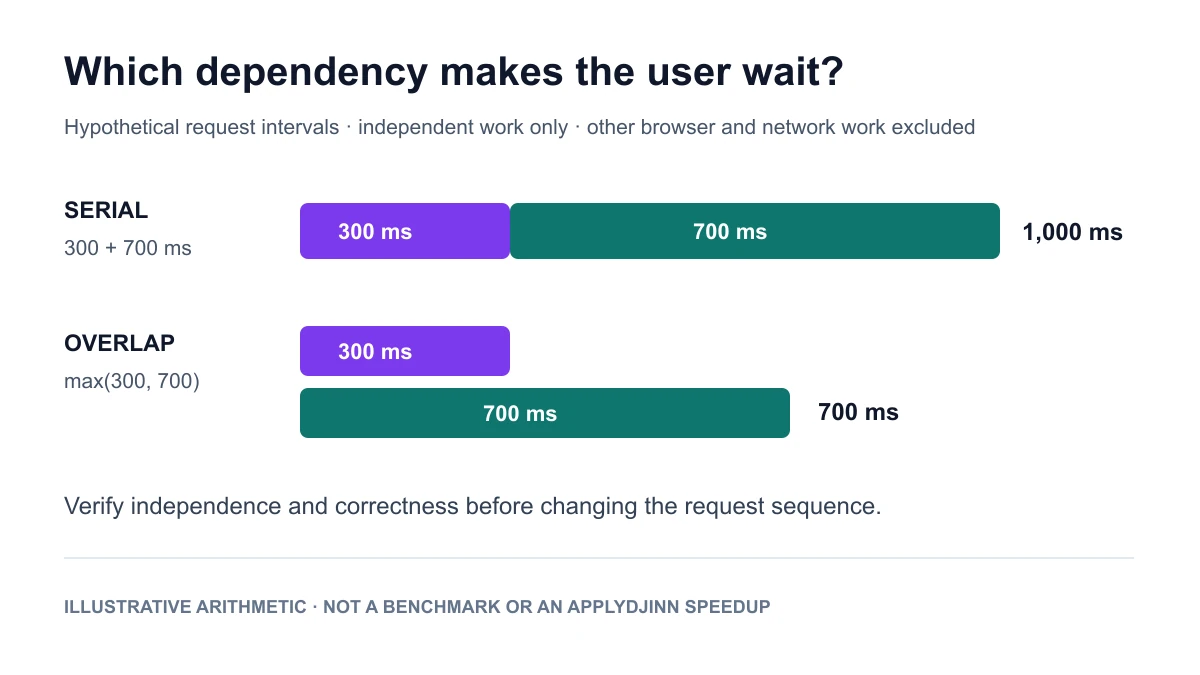
Make a simple dependency diagram before changing code. Suppose, in a hypothetical application, a metadata request takes 300 milliseconds and only then allows a 700-millisecond results request to begin. Their serial request intervals total 1,000 milliseconds before considering other work. If they are truly independent and can begin together, that portion of the idealized path is governed by the slower request rather than their sum. This is an illustrative calculation, not a benchmark.
The independence condition matters. A results query may genuinely require a permission decision or normalized filter value from an earlier response. Starting it speculatively can create incorrect behavior or unnecessary load. Explain which dependency you removed, why it was unnecessary and how the new path preserves correctness. A diagram should support that argument; it should not imply that every request can safely run in parallel.
Look beyond the response
A response can be available while the browser is still busy parsing data, running application code or rendering a large view. Google's INP optimization guide discusses interaction latency in terms of input delay, event processing and presentation work. Use that decomposition to inspect the selected interaction. It helps connect the visible delay to a particular task instead of treating all time after a click as server time.
In the exercise, introduce a deliberately expensive client transformation over synthetic rows. Measure the interaction, then move or reduce that work in a controlled change. Keep the result count and displayed content identical. If you render fewer rows, explain the product change and verify navigation to the remaining results. An apparently faster screen that quietly omits requested data is a correctness regression rather than a successful optimization.
Investigate loading separately
For an initial page load, inspect what supplies the largest visible content and when the browser discovers it. Google's LCP optimization guidance separates time to first byte, resource load delay, resource load duration and element render delay. These parts help locate the next investigation. They do not imply that one asset optimization fixes every slow page or that a local laboratory result represents field experience.
For your sample page, compare a trace before and after one targeted change. You might remove an unnecessary dependency before an image request or reduce client work before content can render. Explain which interval changed and which did not. Keep the image dimensions and content behavior stable where possible so the comparison answers a focused question. A smaller bundle and a faster useful result are related observations, not interchangeable units.
Make caching a correctness exercise
Choose one response that is safe to reuse and define its cache key. Include every input that changes the result, such as the relevant filter, locale or publication version. Decide whether the content is public or specific to a user. For the learning project, avoid caching private responses in a shared public cache. Document the validity rule and a way to observe whether a response was reused.
Then change the underlying synthetic data and test freshness. Can the next reader see the update when your contract says they should? What happens if refresh fails? Can concurrent requests create duplicated recomputation? Build tests around those questions instead of reporting only a warm-cache speed. A cache can improve latency while returning the wrong country's count, and a performance case study should catch that failure explicitly.
Measure distributions and failures
Run a bounded set of repetitions and retain the raw samples. State the sample size and the conditions instead of presenting the fastest attempt. Summarize typical and slower results only when the sample supports the statistic, and include failed or timed-out attempts. If you report a percentile, document the calculation method. A small local experiment can reveal a regression without supporting a claim about the entire user population.
Also keep error rates and resource behavior beside latency. A change that returns quickly because it rejects work has changed the outcome. A change that accelerates one endpoint by consuming all available CPU can slow another journey. In the exercise, use modest concurrency and a fixed request budget. Do not run an uncontrolled load test against an employer's service or a public feed to make your chart look more realistic.
Keep the comparison attributable
Change one meaningful part of the path at a time. Record the revision and explain the hypothesis before running the comparison. Preserve a working baseline so you can investigate a regression without reconstructing the old behavior from memory. If several changes are required for correctness, describe them as a group and avoid claiming that one isolated edit caused the full improvement.
Write down alternative explanations for an unusually good run: a warmed server cache, a different payload, reduced background work or a network fluctuation. Repeat enough to understand the local pattern, then stop when the concrete question is resolved. Additional tests should address a remaining risk. A large collection of repeated measurements is less useful than a clear account of what changed and why the evidence supports the conclusion.
Prepare the release argument
Before calling the experiment complete, verify the whole task with the proposed change. Check that results match the selected filters, counts describe the same scope, navigation remains usable and an error still gives the user a recovery route. Include a fallback or rollback plan for the sample application. The final report should connect the improved interval to a preserved user outcome.
For a frontend interview, emphasize the browser trace and rendering decision. For backend work, explain query boundaries, response shape and safe reuse. For QA, show how you reproduced the delay and protected correctness during the change. Use performance-related vacancies to identify the responsibility you want to address, then read the original employer description rather than inferring a uniform role from the keyword.
A case study another engineer can inspect
Keep the finished artifact compact: the task definition, environment, dependency diagram, sanitized trace, original samples, code change and verification result. Include a short limitations section. State whether the numbers come from local tests, a controlled development service or field telemetry. Do not promote a hypothetical diagram into a measured speedup or turn one warm request into a promise about every visit.
The strongest interview explanation follows the path of the user: what they were waiting for, what evidence located the delay, which change removed it and how you checked that the result remained correct. That explanation shows technical judgment across boundaries. It also remains useful when the next application uses different frameworks, databases or hosting, because the investigation begins with a task and a measurable constraint.
Sources and scope
- Google web.dev: Web Vitals. Definitions, thresholds and the distinction between field and laboratory measurement.
- Google web.dev: Optimize INP. Investigation of input delay, processing and presentation work.
- Google web.dev: Optimize LCP. The loading breakdown and the importance of real-user context.
- This article's application, request timings and experimental plan are original illustrative proposals. They are not ApplyDjinn production measurements or a guarantee of a particular performance improvement. The diagrams identify hypothetical values explicitly.